
In about two months, Title II of the American Disabilities Act goes into effect with accessibility requirements for state and local government entities, including public libraries. The law includes new regulations for online communications, like websites, social media, and mobile apps.
I’m part of the squad that supports LibraryAware, and I’ve been getting questions over the past few months about how LibraryAware will ensure that its digital materials are accessible, especially emails and web carousels.
We’re in this together
Accessibility is a group activity. LibraryAware is actively working to improve our platform to meet accessibility standards, and there are key steps you should take to make your communications inclusive and compliant.
How LibraryAware is Supporting Accessibility
LibraryAware is responsible for providing an accessible foundation for your messages. Our templates should meet accessibility requirements for color contrast, spacing, fonts, and readability.
LibraryAware must also offer the technical scaffolding that keyboards and assistive devices need to navigate digital messages. Here’s what that means for emails and web carousels.
Emails (Newsletters & E-blasts)
Changes LibraryAware has completed:
- Accessible tags, focus areas, and landmarks have been added behind the scenes to help assistive technology like screen readers move easily through emails.
- A heading structure has been enabled so that emails can have a logical reading order.
- Email layouts have been made mobile responsive to be readable on any device and screen size.
LibraryAware template changes in progress:
- All newsletter and e-blast templates are being updated to meet accessibility standards for color contrast, font sizes and spacing, heading structure, and readability. We’ve created this accessibility checklist for your use!
Newsletter Widgets (Book Carousels)
Changes LibraryAware has completed:
- Book cover images include the book’s title and author as alternative text.
- Accessible user navigation and controls, like play and pause buttons, have been added.
- New carousels come with a standard display time of 5 seconds per screen to allow users more interaction time with the content.
- Carousels have been made mobile responsive to be readable on any device and screen size.
Promotional Widgets (Slide Carousels)
Changes LibraryAware has completed:
- Each slide now includes an alternative text field.
- Accessible user navigation and controls, like pause and play buttons, have been added.
- New carousels come with a standard display time of 5 seconds per screen to allow users more interaction time with the content.
- Carousels have been made mobile responsive to be readable on any device and screen size.
Your role in creating accessible communications
Your design, copy, and content choices have a big impact on accessibility. Here are the actions you should take to ensure that your LibraryAware emails and carousels meet the legal standards.
Emails (Newsletters & E-blasts)
To meet accessibility requirements:
- Make sure that all images have alternative text (see image below).
- Create a clear heading structure so that screen readers can navigate your emails. Your top header should be H1, section headings are H2s, subsection headings are H3s, and so on (see image below).
- Choose accessible typefaces, font sizing, and spacing.
- Ensure strong color contrast between text and background colors.
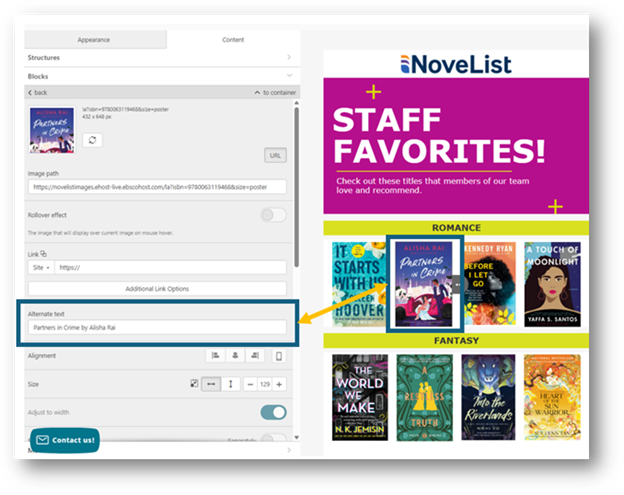
Screenshot showing where to add alt text to images in email
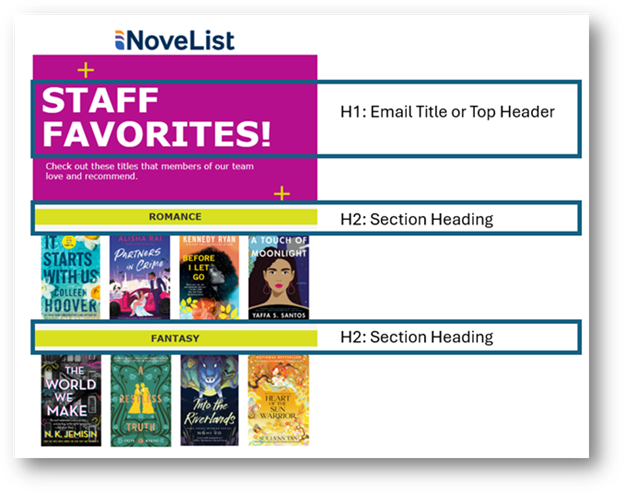
Screenshot defining email header structure
Newsletter Widgets (Book Carousels)
To meet accessibility requirements:
- Add an accessible header to each active carousel so that screen readers can understand the widget’s name (see below).
- Update the display time for each active carousel to 5 seconds or longer (see below).
- Check the accessibility of the website page where your widget is hosted using an accessibility checker like WAVE. Download the browser extension at wave.webaim.org.
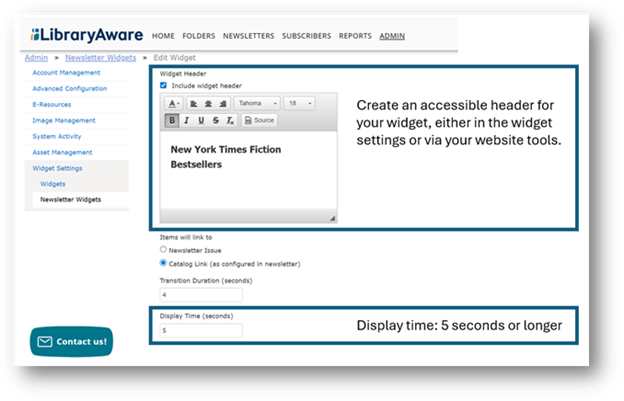
Screenshot showing how to create accessible headers for widgets
Promotional Widgets (Slide Carousels)
To meet accessibility requirements:
- Deactivate any slide posts that do not include alternative text and add alt text before you repost them to a carousel (see below).
- Ensure slides meet color contrast and readability guidelines in these ways:
- Choose typefaces and font sizes that are comfortable to read.
- Left-align your text.
- Use clear and simple language.
- Include white space between elements for easier reading.
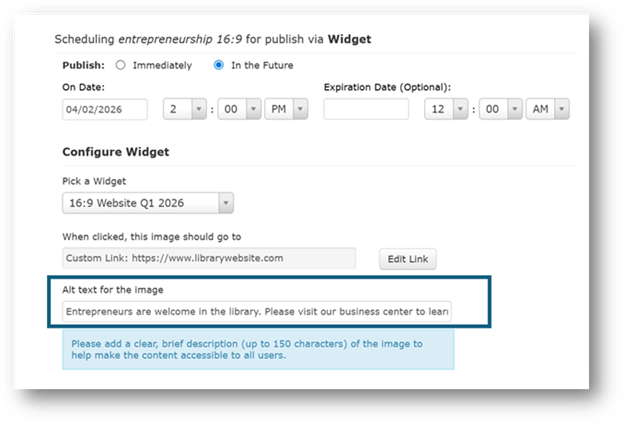
Screenshot showing where to add alt text to widgets
We're here to help
I’m hosting monthly office hours to share LibraryAware’s progress toward accessibility standards and to answer your questions. The next session is Friday, March 13, at noon Eastern. Registration is required.
We’ve created a LibraryAware Accessibility Center that includes recordings of previous office hours, a list of accessibility updates we’ve made, and answers to FAQs.
If you have questions or need additional help, please reach out to us at libraryaware@ebsco.com.
Jenny Schafer is the Manager of Product Management at NoveList. She is currently reading Likeable Badass: How Women Get the Success They Deserve by Alison R. Fragale.